The && operator in JavaScript returns the second operand only if the first is evaluated as true. So, if condition is true, the player object will be given the property { age: 25 }. If condition had been false, nothing would have been added.
Check if a Property Exists in an Object
We can use the in keyword to check if a property exists in an object.
In JavaScript, cloning can be done in two ways: shallow copy and deep copy.
Shallow copy only copies the top level properties. If the original contains references to nested objects or arrays, the copy will have references to the same elements, not independent copies.
Deep copy creates a complete copy, copying all levels of properties. This means every reference to a nested object or array is recursively copied, resulting in a completely independent copy.
Shallow Copy
1const person ={2name:"Walter",3job:"teacher",4};56// new object7const newPerson ={...person };// {name: 'Walter', job: 'teacher'}89// we can also modify or add properties10const newPersonTwo ={...person,job:"cook"};11// {name: 'Walter', job: 'cook'}12const newPersonThree ={...person,age:50};13// {name: 'Walter', job: 'teacher', age: 50}1415const numbers =[1,2,3,4,5,6,7];16const newNumbers =[...numbers];// [1, 2, 3, 4, 5, 6, 7];
In the above example, we use the spread operator ... to create a shallow copy of the person object and the numbers array. Any modifications to the original or the copy will not affect the other.
In the above example, we use JSON.parse(JSON.stringify(person)) to create a deep copy of the person object. Alternatively, we can use structuredClone, which is a more modern and direct method for deeply cloning objects. In both cases, every level of the object is copied, producing a completely independent copy.
Merge Arrays and Objects
In JavaScript, we can use the spread operator ... to merge objects and arrays in a simple and readable way.
Destructuring in JavaScript allows you to extract values from objects in a simple and readable way.
1const player ={2name:"Mario",3age:25,4occupation:"plumber"5};67// Extract values using destructuring8const{ name, age, occupation }= player;9console.log(name);// Mario10console.log(age);// 2511console.log(occupation);// plumber1213// You can also set default values14const{ name, age, occupation, lastname ="Super", isBig =true}= player;15console.log(lastname);// Super16console.log(isBig);// true
Use Destructuring to Extract Values from Arrays
Destructuring can also be used to extract values from arrays in a similar way.
1const players =["Mario","Luigi"];23// Extract values using destructuring4const[firstPlayer, secondPlayer]= players;5console.log(firstPlayer);// Mario6console.log(secondPlayer);// Luigi78// You can also set default values9const[firstPlayer, secondPlayer, thirdPlayer ="Peach"]= players;10console.log(firstPlayer);// Mario11console.log(secondPlayer);// Luigi12console.log(thirdPlayer);// Peach
Set Dynamic Property Names for Objects
In JavaScript, you can dynamically assign names to object properties using square brackets [].
1const person ={name:'Jack',age:38,job:'doctor'};23// Using for...of and Object.entries4for(const[key, value]ofObject.entries(person)){5console.log(`Key: ${key}, Value: ${value}`);6}78// Using Object.keys and forEach9Object.keys(person).forEach(key=>{10const value = person[key];11console.log(`Key: ${key}, Value: ${value}`);12});1314// Using Object.entries and forEach15Object.entries(person).forEach(([key, value])=>{16console.log(`Key: ${key}, Value: ${value}`);17});1819// Output of the three methods20// Key: name, Value: Jack21// Key: age, Value: 3822// Key: job, Value: doctor
1const array =[null,'Apple',undefined,false,true,0];23// Filter out falsy values4const filtered = array.filter(Boolean);5console.log(filtered);// returns ['Apple', true]67// Check if at least one value is truthy8const someTrue = array.some(Boolean);9console.log(someTrue);// returns true1011// Check if all values are truthy12const everyTrue = array.every(Boolean);13console.log(everyTrue);// returns false
By converting an array into a Set, duplicates are automatically removed. Using the spread operator [...new Set(array)], we can convert the Set back into an array with only unique values.
Using the Nullish Coalescing Operator ??
The Nullish Coalescing Operator ?? in JavaScript is used to provide a default value when the left-hand operand is null or undefined.
1const userName =null??"Default User";2console.log(userName);// Output: "Default User"3// If userName is null, "Default User" is assigned45const userStatus =undefined??"Guest";6console.log(userStatus);// Output: "Guest"7// If userStatus is undefined, "Guest" is assigned89const userAge =0??"Age not specified";10console.log(userAge);// Output: 011// If userAge is 0, 0 is retained because 0 is a valid value (not null or undefined)1213const userMessage =""??"No message provided";14console.log(userMessage);// Output: ""15// If userMessage is an empty string,16// the empty string is retained because it is a valid value (not null or undefined)
Be careful when using || as you might get unexpected results. The OR operator returns the first "truthy" operand it finds, which means it treats values like 0, "", false as "falsy" and replaces them with the provided default value.
1const number =0||"new number";2console.log(number);// Output: "new number"3// 0 is considered "falsy", so it is replaced with "new number"45const string =""||"new string";6console.log(string);// Output: "new string"7// "" is considered "falsy", so it is replaced with "new string"
Using Optional Chaining ?.
The Optional Chaining Operator ?. allows you to safely access properties and methods of objects that might be null or undefined without throwing errors, making the code cleaner and more readable.
Values such as non-zero numbers, non-empty strings, arrays, and objects are considered truthy in JavaScript, and thus are converted to true when applied with !!.
Ternary Operator
The ternary operator is a concise way to write an if-else statement.
1const age =20;2const canVote = age >=18?"Yes":"No";34console.log(canVote);// Yes
Using the Rest Parameter
1functionsum(...numbers){2return numbers.reduce((accumulator, current)=> accumulator + current,0);3}45console.log(sum(1,2,3));// 66console.log(sum(4,5,6,7));// 227console.log(sum(10));// 1089functiongreet(first,...rest){10console.log(`Greet ${first}!`);11console.log('Greetings also to:', rest.join(', '));12}1314greet('Antonio','Bob','Charlie','Dave');15// Output:16// Greet Antonio!17// Greetings also to: Bob, Charlie, Dave
Measure Performance with console.time
1console.time("test")23let value =1;4for(let i =0; i <100_000_000; i++){5 value += i;6}78console.timeEnd("test")
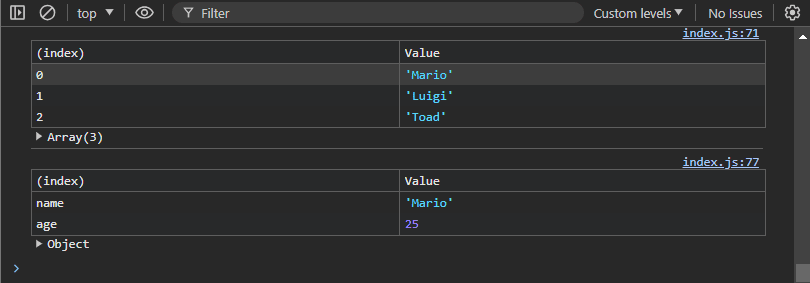
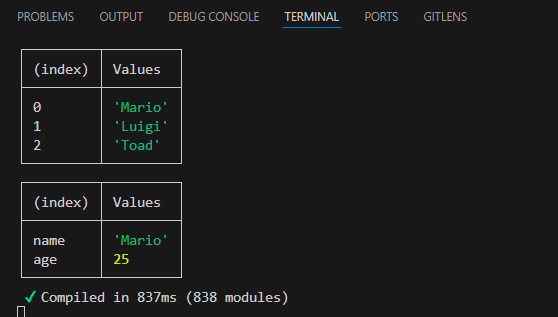
Printing with console.table
1const players =["Mario","Luigi","Toad"];23const player ={4name:"Mario",5age:256}7console.table(player);8console.table(players);